Square Root Two
Native macOS · Vision PromacOS 原生 · Vision Pro
← Back← 返回
Immersive StreamerApple Immersive Video live controlApple Immersive Video 直播控制
Signal pathBRAW deck · FX/USDZ · AIME · LL-HLS
Interface captureReal app screenshot from Xcode runXcode 运行中的真实应用截图

PGM/PVW control room for immersive video live. 沉浸视频直播的 PGM/PVW 导播机房。

A native macOS console for running Apple Immersive Video as a live show: camera deck, foveation, grading, transitions, effects, USDZ overlays, scopes and Vision Pro delivery in one place. 面向 Apple Immersive Video 的实时导播台。 把 Apple Immersive Video 当作一场直播来运行的 macOS 原生导播台:机位甲板、注视点、调色、转场、特效、USDZ 物件、示波器和 Vision Pro 推流集中在同一个控制界面。
Preview预监
PGM/PVW
program and preview节目与预监
FX特效
4 types4 种
text image video usdz文字 图片 视频 USDZ
Source信号源
BRAW
multi camera deck多机位甲板
Output输出
AIV
Vision Pro playbackVision Pro 播放
Live Console实时导播台

Real-time program monitor, not a mockup. 实时节目监视,不是效果图。

Captured from app
macOS Debug build
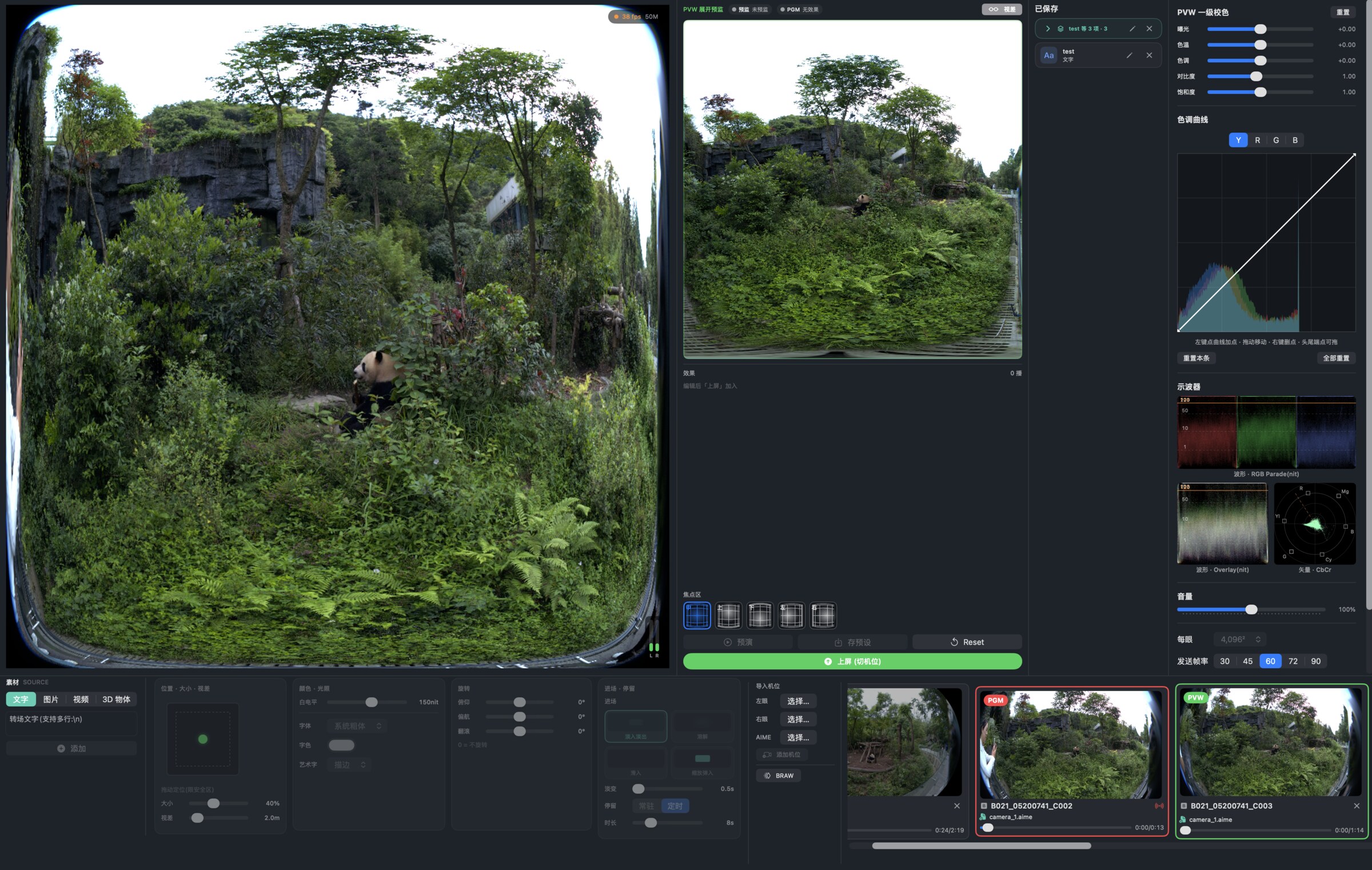
Immersive Streamer app console running with live preview, PVW, grading scopes and camera deck
on air console
00 / ConsoleLIVE UI

One surface for show control从素材到上屏都在一个窗口里完成 一个界面完成全部播控从素材到上屏都在一个窗口里完成

The left side is the program view; the center is the preview and effect stack; the right side is grading and scopes; the bottom is the transition, effect and camera deck. 左侧是节目画面,中间是预监与特效堆栈,右侧是调色与示波器,底部是转场、特效与机位甲板。PGM、PVW、一级校色、示波器同时可见,导播不用在多个工具之间切换。

  • PGM red frame and PVW green frame show broadcast state immediatelyPGM 红框与 PVW 绿框即时显示播出状态
  • Per-camera focus region and foveation preset before take上屏前可为每个机位设置焦点区与注视点预设
  • Text, image, video and USDZ overlays can be rehearsed before program文字、图片、视频与 USDZ 叠加层可在上屏前预演
60 fps monitor监看50M stream budget码率预算4,096² per eye单眼
Working Modules工作模块

Each panel maps to a live decision. 每个面板对应一次直播决策

BRAW · AIME · LUT
FX · USDZ · Scopes
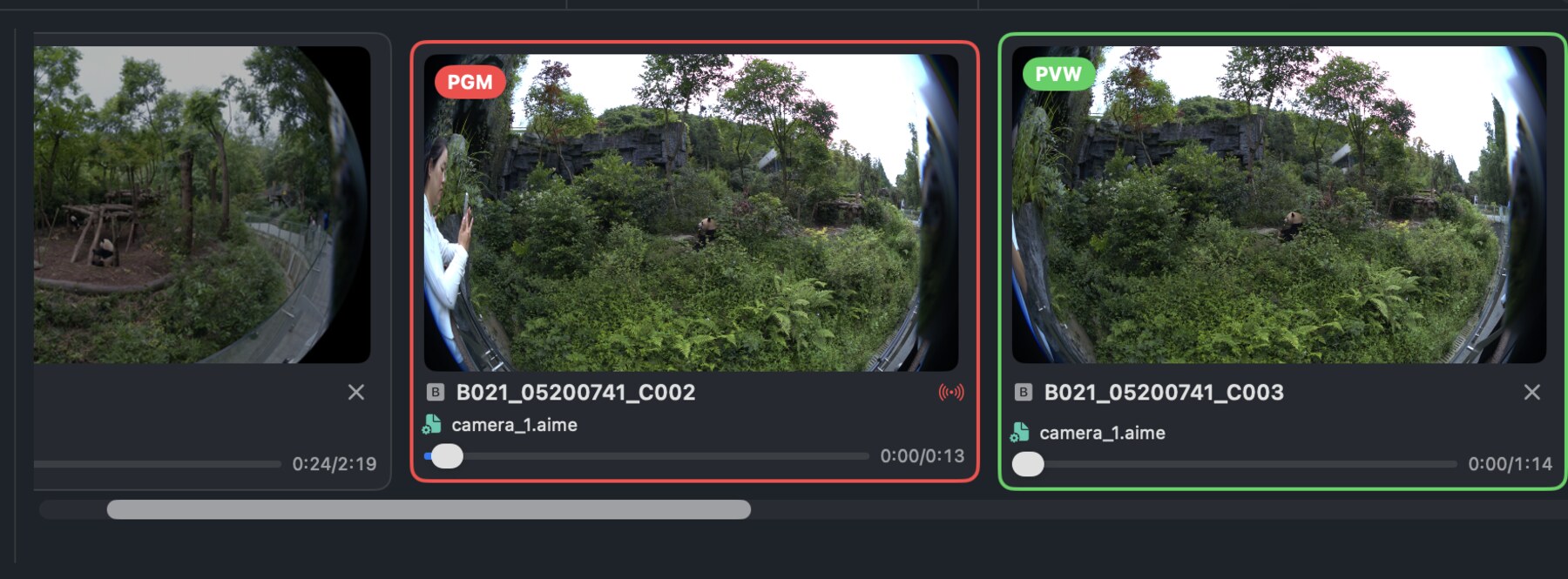
Camera deck with PGM and multiple BRAW camera cards
01 / DeckPGM

Multi-camera deck多机位甲板

BRAW clips load as cards with progress, AIME status, PGM/PVW borders and scrub-ready thumbnails.BRAW 素材以卡片形式载入,带加载进度、AIME 状态、PGM/PVW 边框和可拖动预览的缩略图。
PGMPVWBRAWAIME
Transition and effect editor with text image video and 3D object tabs
02 / FXUSDZ

Transitions and effects转场与特效

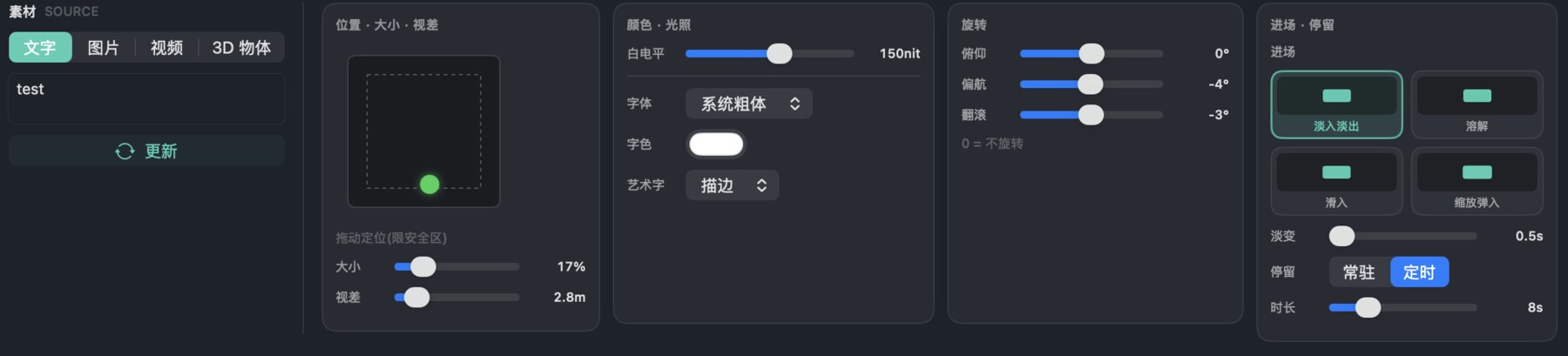
Text, image, video and USDZ objects share the same position, size, parallax, light, rotation, enter and hold controls.文字、图片、视频与 USDZ 物件共用同一套位置、大小、视差、光照、旋转、进场与停留控制。
TextImageVideoUSDZ
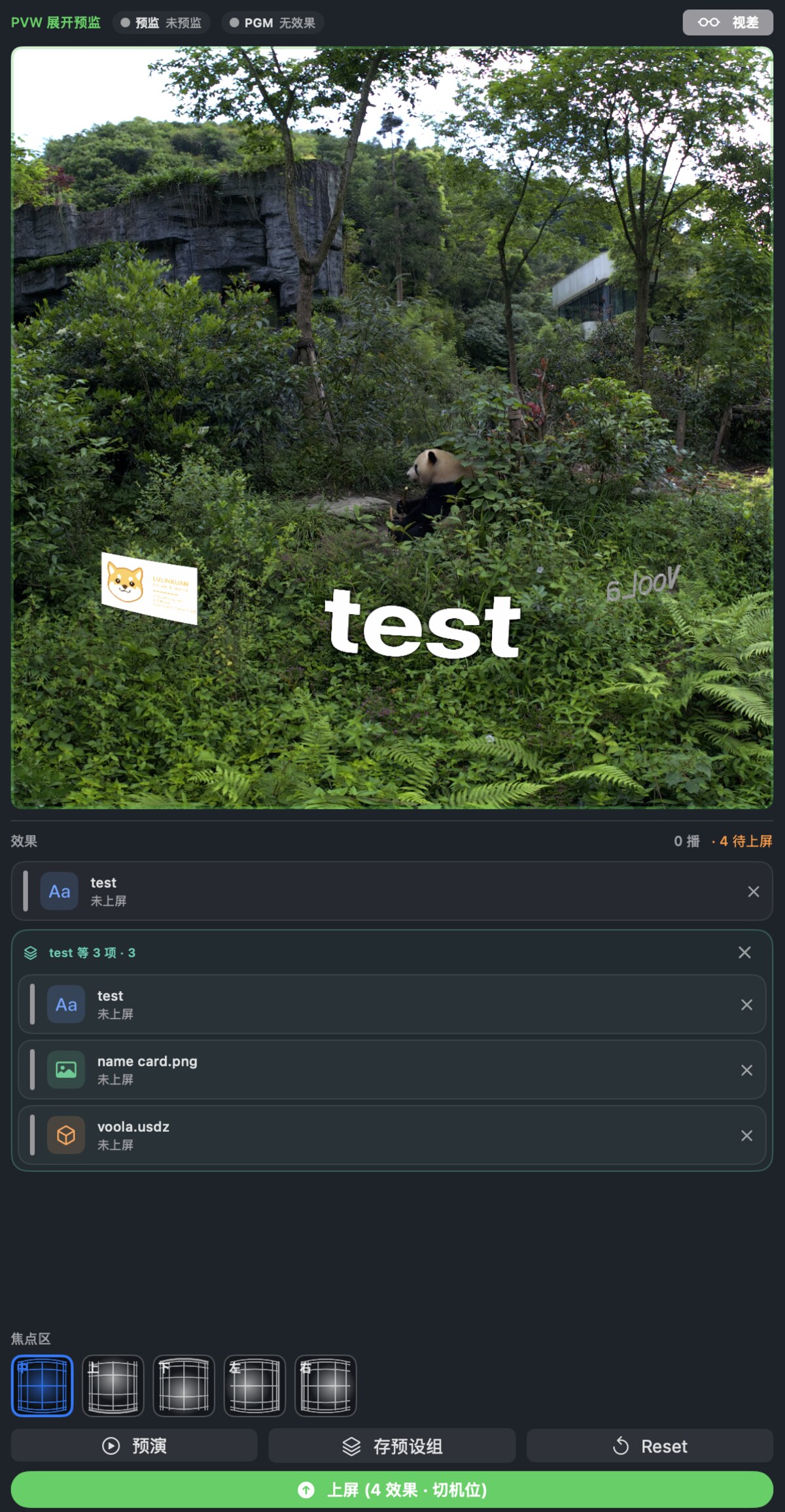
PVW preview with text image and USDZ effect stack
03 / PreviewPVW

Effect stack before take上屏前的特效堆栈

Text, image and USDZ overlays stay grouped in PVW until the operator takes all four changes to program.文字、图片与 USDZ 叠加层在 PVW 中成组待命,导播一次 take 全部送入节目画面。
PVWGroupUSDZ
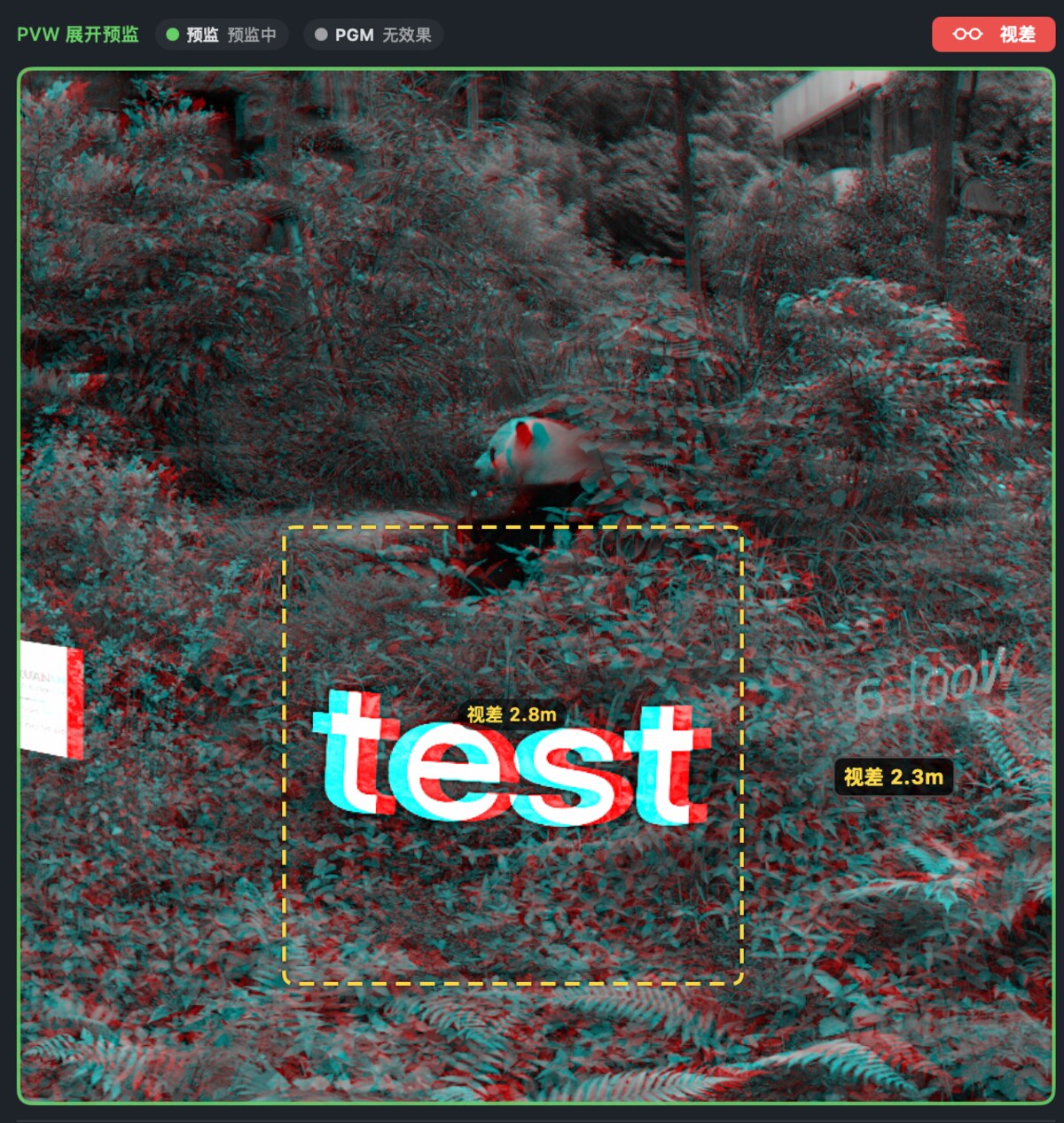
Red cyan anaglyph parallax preview with depth annotations
04 / DepthAnaglyph

Red-cyan depth check红青景深检查

The preview can switch into anaglyph mode to inspect overlay parallax, selection bounds and measured depth before take.预监可切换到红青立体模式,在上屏前检查叠加层视差、选区边界和实测深度。
ParallaxPVWSelection
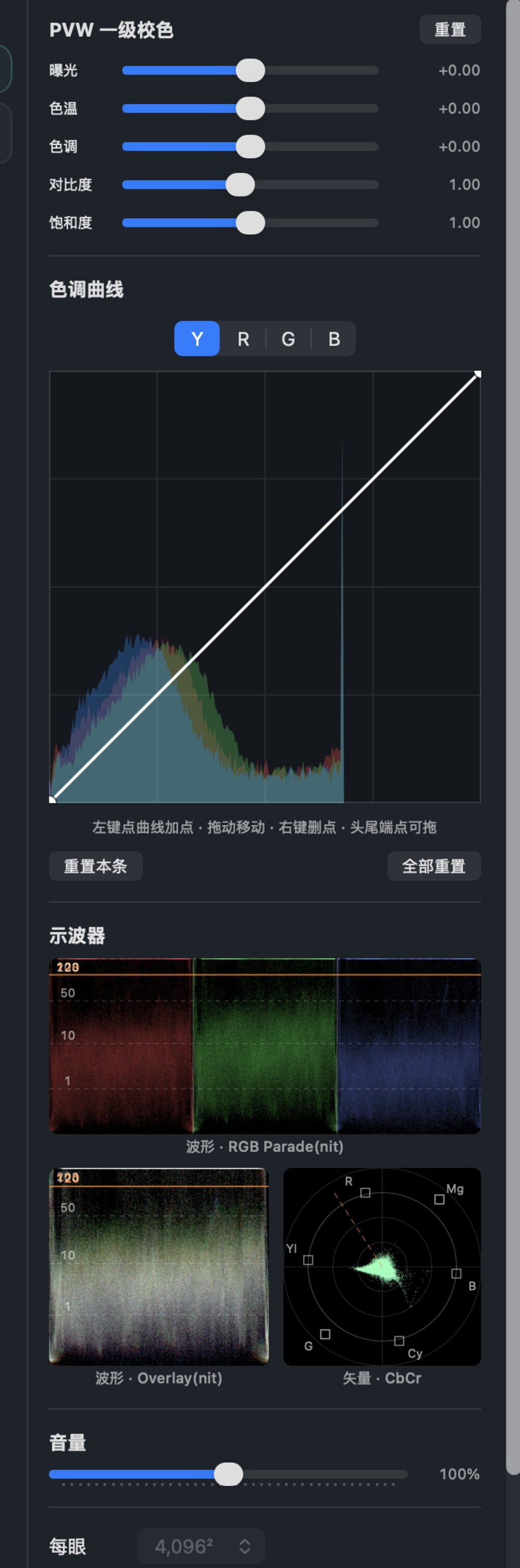
Primary grade controls, curve editor, waveform and vectorscope
05 / GradeLUT

Grade with scopes带示波器的实时调色

Primary correction, curve editing, RGB parade, overlay waveform and vectorscope stay visible during the stream.一级校色、曲线编辑、RGB 分量图、叠加波形与矢量示波器在直播期间全程可见。

RGB ParadeCbCrPVW LUT
Transitions · Effects · USDZ转场 · 特效 · USDZ

Effects are staged like cameras. 特效像机位一样预演再上屏。

Text · Image · Video · 3D
Enter · Hold · Exit
Immersive Streamer transition and effect editor showing text image video and 3D object controls
fx editor
04 / EffectsSTAGED

One spec for transition, depth and media转场、空间位置和素材统一预监 转场、深度与素材共用一套规格转场、空间位置和素材统一预监

Every effect is built as a transition spec: source media, enter animation, position, size, parallax depth, white level, rotation and hold timing. USDZ objects use the same show-control path as text and 2D media. 每个特效都是一份转场规格:源素材、进场动画、位置、大小、视差深度、白电平、旋转与停留时长。文字、图片、视频、USDZ 3D 物体都先进 PVW,再一次上屏进入 PGM。

  • Enter modes include fade, slide, fly-in and scale-in进场方式包括淡入、滑入、飞入与缩放进场
  • USDZ supports pitch, yaw and roll trim for spatial placementUSDZ 支持俯仰、偏航、翻滚微调以完成空间摆放
  • Saved effect groups can be loaded, rehearsed and taken as a batch已保存的特效组可以载入、预演并整组上屏
4 media types种素材类型PVW rehearsal预演batch take整组上屏
Capabilities核心能力

Built for immersive video operations. 沉浸视频直播运行而生。

Native · GPU · Live
No external mixer required
CAP 01SOURCE

BRAW and file-pair sourcesBRAW 与左右眼文件源

Import immersive BRAW or left/right movie pairs, keep per-camera progress and attach AIME calibration.导入沉浸式 BRAW 或左右眼视频对,逐机位保留进度并挂载 AIME 标定。

  • camera cards with thumbnails带缩略图的机位卡片
  • scrub and resume per source逐源拖动预览与续播
  • AIME signature awareness识别 AIME 签名
CAP 02TAKE

Broadcast-style PGM/PVW广播级 PGM/PVW

Changes are staged in preview first: source switch, focus region, grade and overlays all commit on take.所有改动先在预监中待命:切源、焦点区、调色与叠加层都在 take 时一并生效。

  • red program state红色节目状态
  • green preview state绿色预监状态
  • reset pending changes一键重置待上屏改动
CAP 03FOVEATION

Per-camera focus region逐机位焦点区

Choose center, upper, lower, left or right density region before the stream starts or before a restart switch.在开播前或重启切换前,为每个机位选择中心、上、下、左、右的像素密度区域。

  • AIME mesh generationAIME 网格生成
  • foveation presets注视点预设
  • Vision Pro geometry pathVision Pro 几何通路
CAP 04LOOK

PVW/PGM grade separationPVW/PGM 调色分离

Draft grading edits bake to preview first, then copy atomically to program when the operator takes.调色草稿先烘焙到预监,导播 take 时原子化拷贝到节目输出。

  • primary controls一级校色控制
  • curve editor曲线编辑器
  • GPU 3D LUT pathGPU 3D LUT 通路
CAP 05OVERLAY

Transitions and USDZ effects转场与 USDZ 特效

Text, image, video and USDZ overlays can be positioned in the immersive frame, animated in, held and removed.文字、图片、视频与 USDZ 叠加层可在沉浸画面中定位、动画进场、停留与移除。

  • fade / slide / fly / scale淡入 / 滑入 / 飞入 / 缩放
  • 3D object rotation trim3D 物体旋转微调
  • saved effect groups特效组保存复用
CAP 06DELIVERY

Vision Pro stream outputVision Pro 直播输出

The sender publishes a live stream with Bonjour status, local HLS and optional remote mirror upload.发送端对外发布直播流:Bonjour 状态、本地 HLS,以及可选的远程镜像上传。

  • LL-HLS serviceLL-HLS 服务
  • VP receiver monitoringVP 接收端监看
  • remote session status远程会话状态
Signal Pipeline信号链路

From camera media to Vision Pro playback. 从机内素材到 Vision Pro 播放

Source → Preview → Take
Encode → Publish
01
Import导入机位

BRAW or left/right media enters the deck with AIME metadata.BRAW 或左右眼素材携带 AIME 元数据进入机位甲板。

BRAW · MOV · AIME
02
Foveate焦点区

Preset density center prepares the immersive geometry path.预设像素密度中心,准备沉浸式几何通路。

CENTER · U/D/L/R
03
Stage FX转场特效

Text, image, video and USDZ specs are prepared in preview.文字、图片、视频与 USDZ 规格在预监中就位。

FX · USDZ · DEPTH
04
Take上屏

Operator commits pending source, grade and effect changes together.导播将待上屏的切源、调色与特效改动一并提交。

PGM · RESET
05
Encode编码

Frames move through the GPU path to an immersive live stream.帧经由 GPU 通路编码为沉浸式直播流。

MV-HEVC · LL-HLS
06
WatchVP 观看

Vision Pro discovers the sender or follows the remote status feed.Vision Pro 自动发现发送端,或跟随远程状态源观看。

Bonjour · Remote