Square Root Two All apps所有 App
APP STORE · LIVE — — : — —
FORMAT · .AIVUApple Immersive Video
ENGINE · NATIVESwiftUI · Metal
PICTURE · LOSSLESSVideo · mebx · AIME
VERSION · 1.0macOS 26+
AIVU Merger app icon
Native AIVU timeline for MacMac 原生 AIVU 时间线

AIVU
Merger.

Edit the timeline. Keep the immersive master. Arrange, trim and layer AIVU clips, then export one Utility-compatible file. 编辑时间线,保留沉浸母版。排列、修剪、叠放 AIVU 片段,再导出单个 Utility 兼容文件。

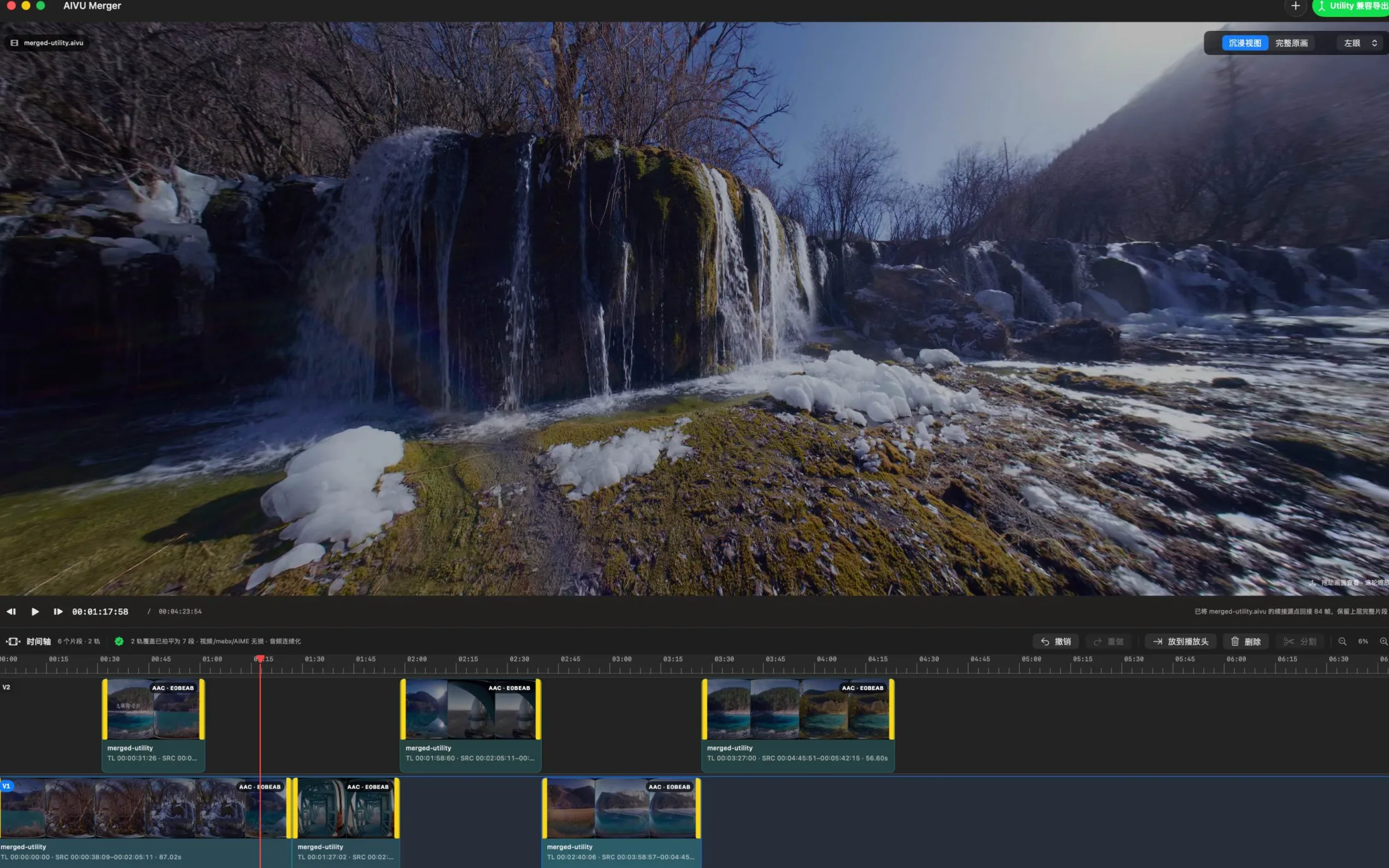
AIVU Merger showing a dual-track edit beneath an immersive waterfall preview
Dual-track AIVU timeline · macOS
84 clips merged · source picture preserved
Editing tools · six essentials编辑工具 · 六项核心能力

A focused editor for the AIVU master.专为 AIVU 母版打造的编辑器。

NATIVE · FRAME-ACCURATE
LOCAL · NO TRANSCODE
01 · ARRANGEREADY

Two-track editing双轨编辑V2 overlays V1, exactly where you place it.V2 精准覆盖 V1。

Drag clips between tracks and along the timeline. Upper-track pictures resolve over the base track in the final output.片段可在轨道间和时间线上自由拖动;导出时,上层画面覆盖基础轨。

V1 · V2 · drag · snap
02 · TRIMFRAME

Frame-accurate trim逐帧修剪Inspect the source under the pointer.指针所到,即看源帧。

Pull either clip edge while the preview follows the source frame, including frames outside the current edit.拖动片段任一边缘,预览同步跟随源帧,包括当前剪辑范围之外的画面。

in · out · live preview
03 · SPLITPLAYHEAD

Split at playhead播放头处分割Turn one source into editable moments.把一个源片拆成可编辑段落。

Cut a selected clip at the current frame, then move, trim or remove either side independently.在当前帧分割所选片段,随后可独立移动、修剪或删除任一部分。

split · undo · redo
04 · PREVIEWMETAL

Immersive preview沉浸预览Navigate the sphere or inspect the source.浏览球面或检查完整原画。

Switch between immersive and full-source views, choose left or right eye, drag to look around and scroll to zoom.切换沉浸视图与完整原画,选择左眼或右眼,并可拖动画面、滚轮缩放。

immersive · source · L/R
05 · PICTURELOSSLESS

No picture re-encode画面不重编码Preserve the immersive image path.保留沉浸画面链路。

The resolved timeline carries video, mebx and AIME data into the merged file without generational picture loss.解析后的时间线将视频、mebx 与 AIME 数据直接写入合并文件,避免代际画质损失。

video · mebx · AIME
06 · DELIVERUTILITY

Compatible export兼容导出One timeline, one deliverable.一条时间线,一个交付文件。

Flatten the two-track edit, maintain continuous audio and write a single AIVU ready for the Apple Utility workflow.拍平双轨剪辑、连续化音频,并生成可进入 Apple Utility 工作流的单个 AIVU。

.aivu · audio · ready
Timeline system · direct manipulation时间线系统 · 直接操作

The edit stays visible.编辑结果,始终可见。

V2 OVER V1
RED PLAYHEAD · YELLOW EDGES
V2
V1
Timeline · 2 tracksZoom · 100%

Move the story,
not the codec.
移动故事,
不动编码。

AIVU Merger keeps the decisions close to the material: thumbnails live on the clips, the preview follows the playhead, and every trim happens at a real project frame.AIVU Merger 让编辑决定贴近素材:缩略图就在片段上,预览跟随播放头,每次修剪都落在真实项目帧上。

  • 01Drop files directly onto either track直接拖入任一轨道DROP
  • 02Snap placements to meaningful edges吸附到有意义的片段边缘SNAP
  • 03Undo and redo timeline changes撤销与重做时间线变更HISTORY
  • 04Zoom from overview to frame detail从全局概览缩放到逐帧细节ZOOM
Workflow · four direct steps工作流 · 四步直达

From source files to one AIVU.从源文件到一个 AIVU。

IMPORT → EDIT
PREVIEW → EXPORT
01 · IMPORT

Drop AIVU files拖入素材

Add one or many .aivu sources from Finder to V1 or V2.从 Finder 将一个或多个 .aivu 源文件加入 V1 或 V2。

INPUT · .AIVU
02 · EDIT

Shape the timeline组织时间线

Place, trim, split and layer each moment at frame accuracy.以逐帧精度排列、修剪、分割与叠放每个片段。

V1 · V2 · FRAMES
03 · VERIFY

Preview the result预览结果

Play the resolved edit in immersive or full-source view before delivery.交付前在沉浸视图或完整原画中播放已解析剪辑。

METAL · L/R EYE
04 · EXPORT

Merge for Utility兼容导出

Write one lossless-picture AIVU with timeline-resolved audio.输出一个画面无损、音频按时间线连续化的 AIVU。

OUTPUT · .AIVU
Available now · Mac App Store现已推出 · Mac App Store

Build the cut.
Keep the master.
完成剪辑。
保留母版。

AIVU Merger is built for teams already working with Apple Immersive Video masters who need a precise, direct path from several files to one deliverable.AIVU Merger 面向已经使用 Apple Immersive Video 母版的团队,提供从多个文件到单一交付物的精准直达路径。

[↗] View AIVU Merger on the App Store在 App Store 查看 AIVU Merger